Showing posts with label Articles. Show all posts


The Ultimate Ways To Repair A Dead MOT G Part 2 

By bricked phone, I mean a hardbrick. SO hardbrick means dead phone. You cannot get to bootloader or recovery let alone startup. The phone's screen doesn't even light up, at least that's what happens in a hardbricked MOTO G.


Note: 

i) This article doesn't include the hardware repairs.. 

ii) By Moto G here it means Moto G first generation. It may also work on other generation but I haven't tested it yet as I don't have other gen phone.

iii) If your phone is liable to warranty then please get it repaired under warranty.


So the main focus of this article is to revive a dead Moto G but this doesn't mean that there's only one reason for a phone to die. If you're like a phone guy and play with off limits settings like bootloader then your dead phone is probably caused by faulty system rather than hardware problem.

As already mentioned, this article isn't for hardware problem(except battery, you'll get it later in the article). SO if your phone is dead by mistakes like submerged, electrical short circuit, shock, etc then it's better to buy a new phone or claim your insurance as they are nearly impossible to be fixed by common users and they void warranty.

If you think that it is hard bricked then consider looking part 2 of this article HERE.

Now getting started with the real problem,

DEAD BATTERY
So this has been the most common problem for a Motorola phone users. Well most do get their phone booted after few minutes of charge, some don't. 

So let's say you emptied your battery and the phone switched off. Then you put up the phone for charging and the nightmare, phone doesn't turn on. Now here most people with the problem has reported notification LED blinks. If you have it too then you probably won't be needing a battery replacement. 

The following are possible solutions:
i) Charge the phone for some time, at least 30 min.

ii) Press the power button without letting go, 15 secs is needed while phone is well but as your phone is dead, you might consider holding it for 2 minutes.

iii) Try going to fastboot mode i.e. power button + vol down for few seconds. Don't bother holding them for longer time. 

iv) Now if your phone still doesn't wanna boot then you might wanna consider an alternative method. It requires you to open up the mobile phone and yes it voids warranty. But as you have made it this far in the article, I don't think your phone has warranty left. 

Follow these steps or watch the video here if you've had enough reading:

-SO first disconnect charging cable and remove the back cover and then unscrew all the screws.
-Now remove the outer covering and you're in the battery and motherboard section.
-Detach the battery, its very easy, all you gotta do is lift the connector.
-Now  plug in the charger. Please consider original charger or similarly rated one.
-Now if you have some display on the screen then immediately re-plug the battery without disconnecting charging cable. 

Please refer the video if you're confused:

So even after that last solution, if it didn't work and you've got no LED at all then you might wanna consider replacing battery or could try next part. Now replacing is easy, pull old one out of motherboard and then put a new one. 

Can't do it? Read it in instructables.

Now if it still doesn't boot or you don't think your battery is the problem than you might have hard bricked the device considering you still get occasional LED blink if you plug in charger.

To detect if your phone is bricked, just connect the dead device to an computer, if your hear the notification sound of a new device plugged in then you might want to consider steps in the next part: 


Nobody likes being redirect to various pages just to click on download button again and again then get bombed by ads. If you have a website with certain files for user to download then it is a bad idea to host the file in a site that annoys user. 

Yes, keeping files in a paid hosting can easily solve these problems but what if you cannot pay?? Below are some top notch sites that provide direct download links or hotlink for public sharing for free.

If you have fast internet with unlimited data plan then you probably don't know the pain of the slower side of the internet. Yes, it's painful, frustrating and challenging having a limited internet. Be it apps updating unnecessary or windows doing unstoppable update it's real pain to fell your internet being used and not being able to control it. Having to use a slow DSL myself, I did search the whole google for the solution and finally found that works well.


Google Webmaster is a vital tool for increasing your site's visibility in search engine and hence generate traffic. As you submit the sitemap of your blog, posts and pages of your blog are indexed and hence more possibilities in search engine..


So YouTube is the top choice for streaming videos as we all know but it's just stream. You need to be online all the time, except for some countries where saving the video offline is available but is just playable in YouTube app.


Everyone knows Android as it is the top choice for mobile manufacturer worldwide for its open source nature and affordability of the mobile that's running android.

This is the article where you'll no longer need an actual android based phone to run andoroid application or just explore android.


So, basically the blogger users are either in strict budget, don't want to use  web hosting, want minimal settings or just love Google. This doesn't meant that bloggers aren't allowed or can't use the features that are available in other platform  like WordPress...

In this article I am going to demonstrate a by making a download page based on table for a blog. Its probably the easiest and only requires couple of skills like being able to use Microsoft Word, file's download link and just simple knowledge to copy & paste.


MIUI 7.5 Lollipop Root for Redmi 2 Prime


Guide for rooting Xiaomi Redmi 2 Prime Android Lollipop MIUI v7.5 .
Please follow the steps carefully, although even if you brick it then it isn't that hard to  unbrick :p...


So everybody knows that wires are irritating. And using wires in the mobile phones are more irritating. So there are times when we have to transfer files between our computer and other devices. So for this the most obvious choice is data cable. But it irritating to use the cable, seriously. If you are not irritated then you must be special one, because I do.


Okay I heard about it and I feared that it would happen to me also. It did happen but I quickly found the fix for it that worked for me.

When and where 

The problem is very common and it is in all the distribution of GTA V pc i.e. retail and cracked(pirated). Missions like Blitz Play, Caida Libre and many other are affected by it. SO the problem seems to occur in two situations, character switching and use of weapon from the vehicle. SO in my case it was the last character switching to Franklin from Michael after Trevor kidnaps the wife of Martin and brings her to Michael. The character switch is automatic and there's no chance to save the game. So after some experiments I found a working solution.


This is a simple lock system. Patterns locks are used in smartphone and several touch devices but it is not officially available in PC's or non touch devices. This is a simple software that allow us to use this fantastic lock system in PC with more advance option.


So yesterday when I fired up the GTA V(RG Mechanics repack) it was stuck in the loadscreen. All I got was "Initializing Social Club" and after a minute or two I got "social club error error code: 17". SO this wasn't good that's why I searched the internet and found the solution for it.


Having slow internet or low bandwidth is very painful as background programs eat our bandwidth and make our internet package finish fast or internet run slow. Background programs like antivirus uses available internet for checking updates or automatic update. This is normal for broadband unlimited computers but users like mobile broadband, limited connection, DSL, dial-up, etc. This article is about stopping such internet eater programs manually. Most of the programs have option for this but still they use some. I already had written a article "Increase your internet speed by 20%" for releasing reserved bandwidth Windows. Well this method doesn't require any software as windows firewall does this. 

There's a much much easier to block the internet use of a program by using a software called NetBalancer, read this post.

1. First open Windows Firewall. Just search it in start(for win 7&8). Turn it on if it is off.
2. Now click on Advance settings.
3. Now click on Outbound Rules then select New Rule... from left panel.


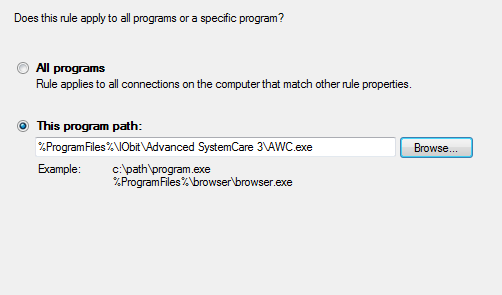
4. Now select Program as rule type then in step-2 browse your program.


5. Now give the name* and description(opt.)


6. Now click on next then keep all default then finish it.

7.Now you can see your program in the list.

8. If you want to cancel the connection ban then just click on the blacklisted program from the list then on bottom left select delete then confirm it.


Some people are asking questions that their keyboard's specific key has stopped working and want to remap the keyboard rather than replacing the keyboard. Most of them get their solutions by using 3rd party software and it is good because custom registry editing may create problem if used improperly and most of the people don't often get the understandable solution for custom registry mapping. SO, I have decided to write a article about remapping the keyboard keys from both methods i.e. manual registry editing and by using 3rd party applications. This is for windows.


So this is a Rockstar Game's masterpiece released in 2004. Yes I am talking about GTA San Andreas. A very awesome game for the passionate gamers. Well its been 10+ years since its release so it's not suitable to compare this to anything like graphical quality, gameplay, etc of games now days. But this is a special game. As its requirement is a lot basic according to the qualities of PC's now days and its multiplayer version requires less bandwidth many people still choose to play this game.

As a passionate gamer I can say that this game has got some juices left. This is probable easiest game to apply a mod to. Modding this game isn't so hard too but it requires some time to learn. I have written 3 articles about modding this game. You can read about them from the following hyterlinks:
i) Modding guide p1
ii) Modding guide p2
iii) MED Tutorial(Map editting)

The following are some sites from where we can downloads tons of mods:
www.gtagarage.com
www.gtainside.com
www.gta-downloads.com
www.thegtaplace.com

This game can be used as a racing game, shooting game, flying game. Playing this game as a flight simulator is also a good idea but this games doesn't have interior functions in vehicles. But still the models can be downloaded with the detailed interior although interior are just mapped images and the devices wont work as real. Not to disappoint there are many mods in the sites I listed above which adds various functions like Airplane HUD, speedometer, fueling and many many more.
Cockpit view of virtual flight simulation using FLY US 747 and Oldair mod

Another screenshot with external view

If you are unknown to GTA San Andreas mods then its good time to start. At first download CLEO and then you can download tons of cleo scripts from the GTA Mods sites. There are other types of mods like model, maps, etc. You can download them and then install them as instructed.

SF airport extend map mod


There is another type of mods that modifes the binary files of game. They can modify the lighting system of game enhancing the gameplay. Some of them are called are called ENB mods.

Project 2dfx

SO this game has a lot to give to people despite of its missions. There are tons of mod out there which will boost the game performance and gameplay feelings.
Previous PostOlder Posts Home